Beyond Cookies – How To Stop The Invisible Browser Fingerprint That Tracks You Everywhere
For years, the privacy advice was simple: clear your cookies, use incognito mode, or click “Reject All” on those annoying consent banners. That advice is now outdated.

A groundbreaking study published last year has delivered the first peer-reviewed proof that the $600 billion online advertising industry has moved on from cookies. The new tracking method is called browser fingerprinting, and it works even if you never log in, never accept cookies, and have legally opted out under privacy laws.
Researchers from Texas A&M University and Johns Hopkins University built a tool named FPTrace to measure exactly how this works in the wild. They simulated real user sessions, systematically altered browser fingerprints, and watched what happened to the ads being served and the bids advertisers placed in real time. The results were clear: when the fingerprint changed, the price advertisers were willing to pay to target that “user” changed with it. Tracking signals dropped. The system was actively using the fingerprint to follow people across sessions and sites.
And crucially, this happened even in tests where cookies were fully deleted and users were in “opt-out” mode under GDPR and CCPA rules. The law’s exit door for cookies does not cover fingerprinting.
How Browser Fingerprinting Works (No Permission Required)
Every time your browser loads a page, it leaks dozens of tiny, seemingly harmless signals:
- Screen resolution and color depth
- Installed fonts
- GPU model and graphics capabilities
- Audio processing signatures
- Browser version, plugins, and language settings
- Time zone
- Canvas rendering differences (how it draws hidden shapes)
- Whether you run an ad blocker
- Even battery level in some cases
Alone, each detail is common. Combined, they create a unique “fingerprint” that can identify your device with startling precision. No cookies. No login. No pop-up asking for consent. Just loading the page is enough.
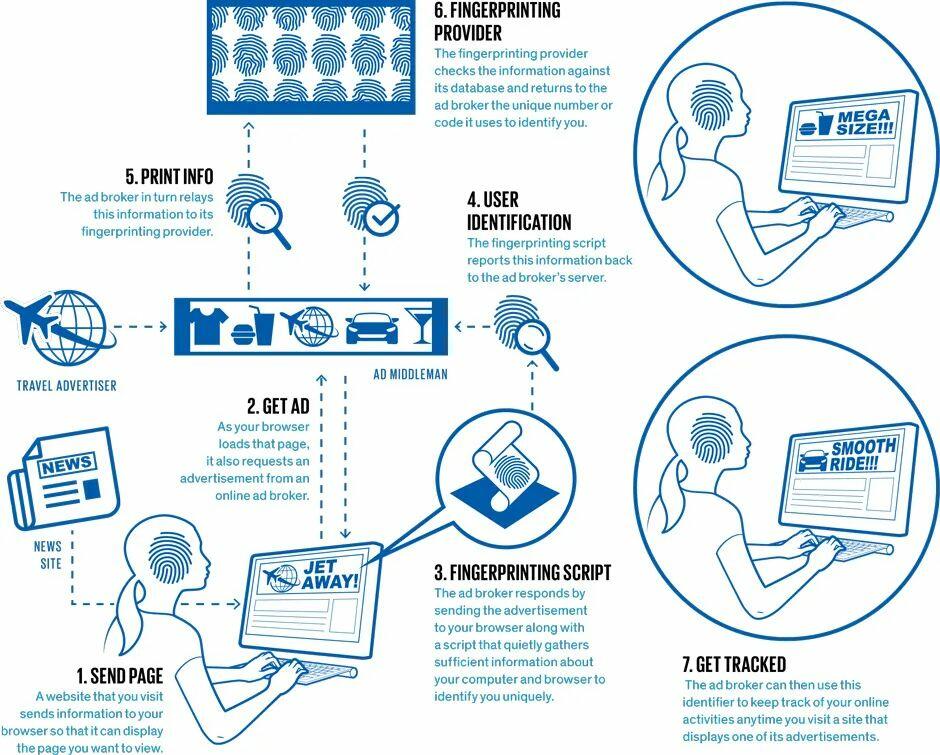
Studies have long shown how pervasive this is. Princeton’s Web Transparency Project and related research have repeatedly found fingerprinting scripts running on a significant share of popular websites.
Princeton researchers tested the top 10,000 websites.
Fingerprinting scripts on 88% of them.
The EFF tested browsers directly.
83% had a fingerprint unique enough to track with no cookies at all.You do not have to visit a shady site.
You just have to open a browser.— AI Highlight (@AIHighlight) April 21, 2026
The Electronic Frontier Foundation’s long-running Cover Your Tracks test (formerly Panopticlick) has demonstrated that a large majority of browsers produce fingerprints unique enough to track users without any cookies at all—historically around 83% or higher in large samples.
Why This Matters Now
Cookies are dying. Google has been phasing out third-party cookies in Chrome, and Apple has aggressively blocked them in Safari for years. Advertisers needed a replacement that users cannot easily clear, block, or reset. Browser fingerprinting is that replacement: it is invisible, persistent, and rebuilds itself if your setup changes slightly.
The result? Targeted ads that follow you across devices and sessions, even when you think you’ve gone “private.” And because it operates below the surface of most privacy laws, the protections many people rely on simply don’t apply.
What Actually Works to Protect Yourself
Most people get privacy wrong by making their setup more unique (rare browsers + 30 extensions = the most identifiable fingerprint on the internet). True anonymity comes from uniformity, not obscurity.
Here are the proven defenses, ranked by effectiveness:
1. Choose the right browser (the single biggest decision)
- Tor Browser – The gold standard. It forces every user to share the exact same fingerprint. Anonymity through uniformity.
- Brave – Excellent middle ground for everyday use. It randomizes canvas, WebGL, audio, and other fingerprintable surfaces every session.
- Firefox (with strict settings) – Strong out of the box and highly customizable. Avoid Chrome for privacy-sensitive activity; it offers no native fingerprint resistance.
2. Add the right extensions (Firefox or Brave only)
- uBlock Origin – Blocks fingerprinting scripts before they can run. (Note: Chrome’s Manifest V3 severely limited the full version; Firefox is required for maximum protection.)
- CanvasBlocker – Randomizes your canvas output whenever a site tries to read it.
3. Flip one powerful Firefox setting Type about:config in the address bar → search for privacy.resistFingerprinting → set it to true. This standardizes canvas, timezone, fonts, and other outputs so you blend in with everyone else. Takes 30 seconds and makes a measurable difference.
Bottom line: Clearing cookies no longer protects you. The advertising industry has quietly built a more resilient tracking system that operates in the shadows of your browser.
Tyler Durden
Thu, 04/23/2026 – 15:00
via ZeroHedge News https://ift.tt/wiOzfot Tyler Durden